Smart Koi Pond Project
Project Overview
If you enjoy working on your pond setup, you can easily turn an ESPHome or Arduino board into a simple Koi pond monitor. In this guide, I’ll walk through how I read the water temperature, humidity, the pump and UV light, plus the WiFi signal and general uptime — all shown directly in Home Assistant.
You’ll get the wiring diagram, the basic setup and the exact ESPHome YAML I’m using. It’s not a difficult project, and it works whether you have a small backyard pond or a larger Koi setup. The whole idea is just to keep an eye on what’s going on in the water, so you notice any changes before they become a problem.
Step-by-Step Guide
- Connect the ESP32/ESP8266 board to your sensors.
- Upload the ESPHome YAML configuration to your device.
- Integrate the device with Home Assistant.
Materials
- In this example i used a NODEMCUV2.
- DHT22 AM2302.
- Two wired NTC (5 kΩ NTC-thermistor).
- 5 kΩ reistor.
- Optional: you can add a 10K pull-down resistor on the DHT22 data pin if the signal is unstable.
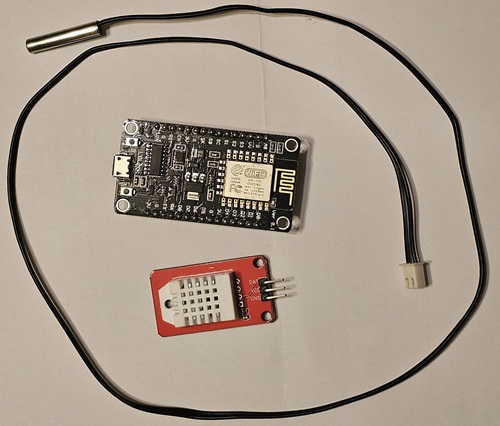
Project Images
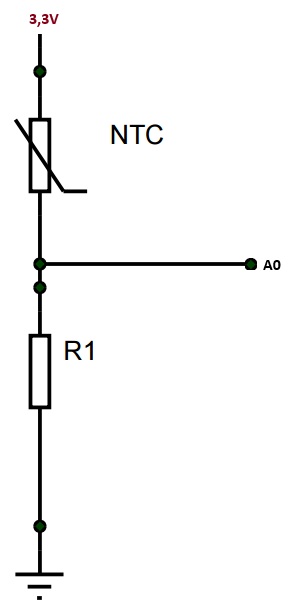
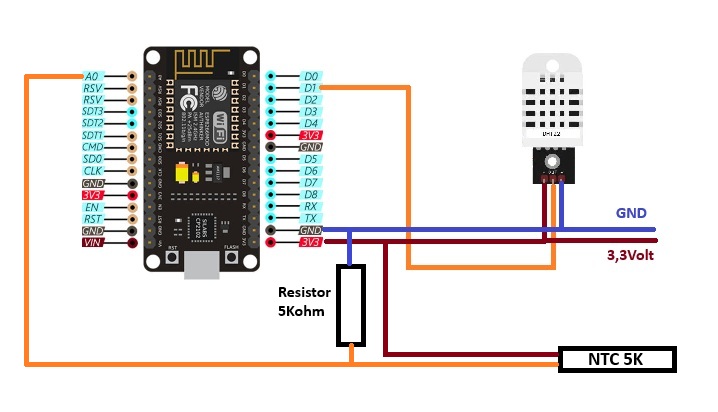
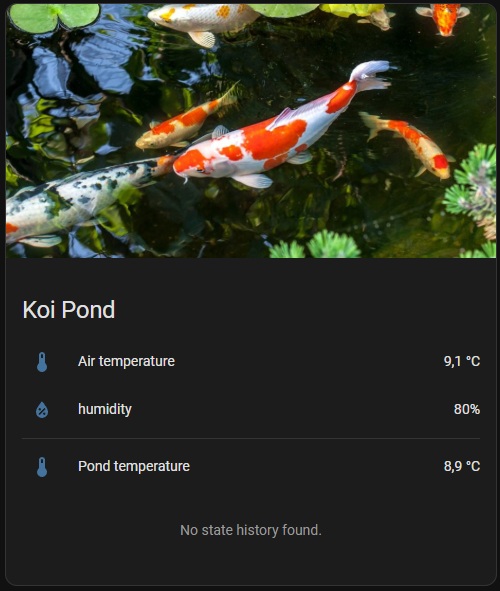
ESPHome KoiPond Sketch
esphome:
  name: pond

esp8266:
  board: nodemcuv2

logger:

api:

ota:
  platform: esphome
  password: "ac416d0e41631e70a0f2fbfdfe4ccca5"

wifi:
  ssid: !secret wifi_ssid
  password: !secret wifi_password

  ap:
    ssid: "Vijver Fallback Hotspot"
    password: "alz4yUCJt1Fe"

captive_portal:

sensor:
  - platform: uptime
    name: "Uptime Pond"

  # DHT22 temperature + humidity
  - platform: dht
    pin: 5   # GPIO5 (D1)
    temperature:
      name: "Pond Temperture"
    humidity:
      name: "Pond Humidity"
    model: AM2302
    update_interval: 15s

  # ADC
  - platform: adc
    id: source_sensor
    pin: A0
    filters:
      - multiply: 3.3
    update_interval: 15s

  # ADC voltage to risistor (NTC)
  - platform: resistance
    id: resistance_sensor
    sensor: source_sensor
    configuration: DOWNSTREAM
    resistor: 5000
    name: "NTC Resistance Sensor"

  - platform: ntc
    sensor: resistance_sensor
    calibration:
      b_constant: 3470
      reference_temperature: 20
      reference_resistance: 5000
    name: "Pond Water Temperture"

  - platform: wifi_signal
    name: "Pond WiFi"
    id: wifi_signal_db
    update_interval: 60s
    entity_category: "diagnostic"